
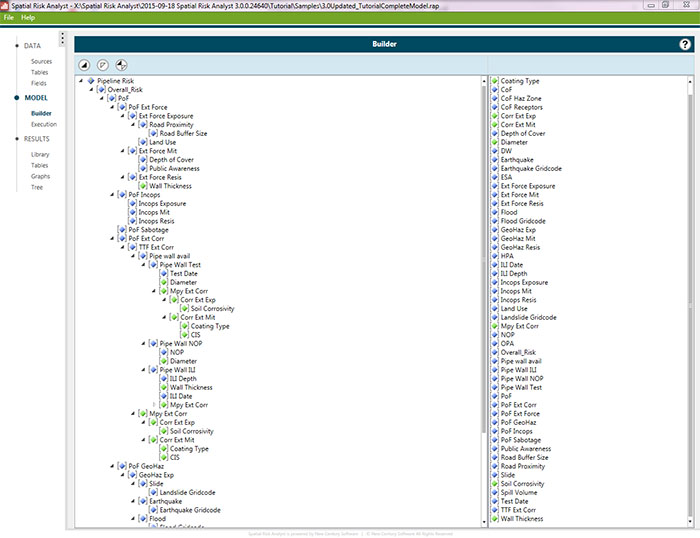
Assess risk on transmission pipelines, natural gas distribution systems, and gathering lines.

Integrate information, model interactions, and develop insights using the powerful Spatial Risk Analyst. This robust desktop application allows pipeline operators to overcome common data integration challenges.
Spatial Risk Analyst runs transparent and fully configurable models based on a powerful yet simple-to-use visual basic calculation engine. Its time-saving features also allow you to perform dynamic segmentation to determine changing input variables along the pipeline. Spatial Risk Analyst doesn’t require data imports or “bridges” because it accesses data in its existing location. Plus, it can access both spatial and tabular data through any number of database connections.
The flexible design of Spatial Risk Analyst allows operators to run a wide variety of risk models against their data. The utility of Spatial Risk Analyst grows exponentially as your company’s data analysis practices evolve over time.
Assess risk on transmission pipelines, natural gas distribution systems, and gathering lines.
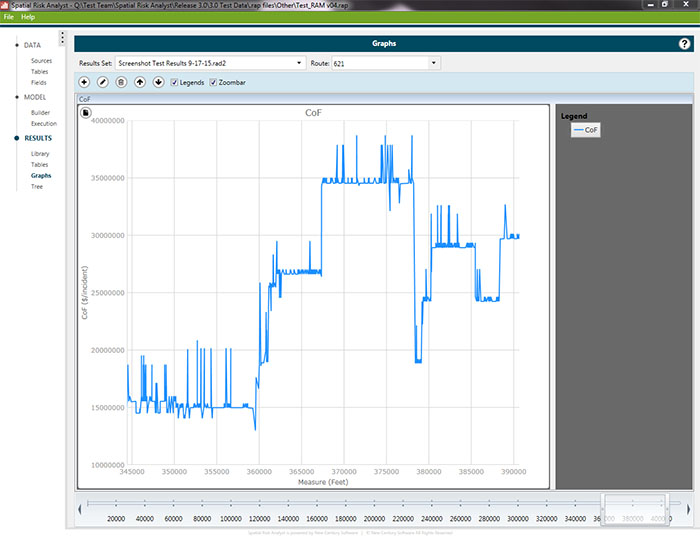
View results in a table, graph (example above), or tree and export the result set in Excel, Access, Oracle or SQL format.
Spatial Risk Analyst increases productivity by automating data integration and reducing errors often associated with the manual manipulation of data. SRA lets you view and customize all algorithms to meet the unique needs of your company. The real value comes from the insights gained through this information analysis.
Develop your own models or choose from existing models offered by Integrity Plus, including:

QRA Model – Quickly and objectively measure risk along the pipeline. Intended for Pipeline Integrity Management and Risk Engineers responsible for regulatory compliance, Spatial Risk Analyst boosts your ability to plan appropriate measures for prevention and mitigation.

Annual Reporting – Integrate multiple data sources to automate the production of PHMSA and NPMS annual reports. It’s easy to use, the report can be run multiple times throughout the year for internal review.

MAOP Validation – Applies regulatory logic in the calculation of MAOP and verifies against the current established MAOP. Perform a “what-if” analysis to evaluate the impacts of corrective actions.

Data Quality Checker – Utilizes validation rules to identify data inconsistencies. (ex. wall thickness not valid for a given diameter, coating not valid for install year, SMYS inconsistent with grade.)
Key software features include the ability to:
SPATIAL RISK ANALYST is a trademark or registered trademark of New Century Software, Inc. Third party trademarks, trade names, product names and logos may be the trademarks or registered trademarks of their respective owners.