
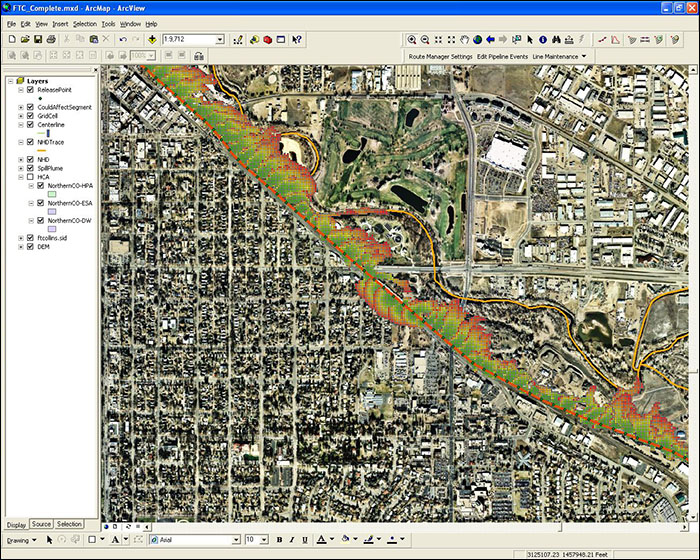
User specified release points are applied to demonstrate overland spread and water transport analysis for a hazardous liquid pipeline.

Spill Impact Analyst provides invaluable assistance when developing highly accurate leak mitigation and response plans. With this accurate modeling, operators can create plans to effectively respond to leaks and remedy a situation in less time, with fewer environmental damages, and at an overall lower cost.
Using Spill Impact Analyst, operators can quickly evaluate the potential for pipeline leaks, predict worst-case release volumes, and create plans to mitigate the impact of those potential leaks. The output reporting is straight forward, designed so even casual users can understand the spread of the leak over a terrain and grasp where and how far it will travel.
This flexible Esri ArcGIS desktop extension uses the most advanced overland flow analysis engine available, FLO-2D, to realistically project the speed and spread of the spill over the surface. It also identifies the High Consequence Areas (HCAs) and stream channels that could be affected. This powerful analysis engine provides unmatched in-house capabilities and its advanced features can even calculate pool fire thermal radiation hazards around the resulting spill plume and display those results visually in ArcMap.
User specified release points are applied to demonstrate overland spread and water transport analysis for a hazardous liquid pipeline.
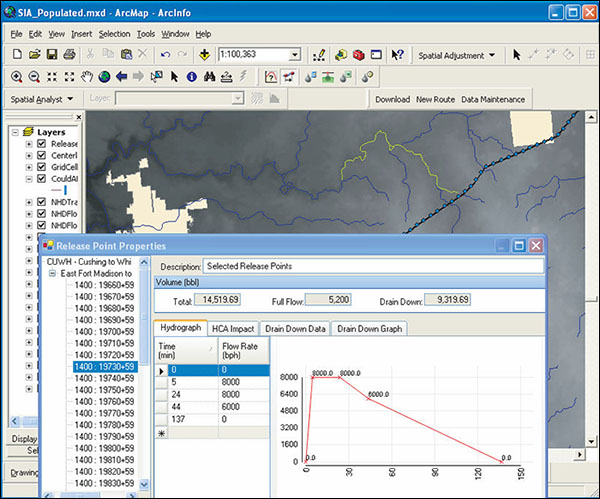
Pipeline spill volume is accurately calculated in a time versus flow rate hydrograph.
SPILL IMPACT ANALYST is a trademark or registered trademark of New Century Software, Inc. Third party trademarks, trade names, product names and logos may be the trademarks or registered trademarks of their respective owners.